The Cadulis application, documentation, and email support are nevertheless available in your language. You can create your account for free in 1 minute!

Connect Cadulis to Sellsy
Sellsy Overview
Sellsy is a comprehensive French CRM suite that enables you to manage the entire customer lifecycle: marketing, sales, invoicing, and cash flow. Designed to simplify the daily operations of small and medium-sized businesses, the platform centralizes your data to streamline collaboration and secure your commercial management.
More than 19,000 companies trust Sellsy to save time and steer their business. By connecting Cadulis to Sellsy, you benefit from a powerful bridge between your field operations and your administrative management.
The 3 Pillars of Cadulis x Sellsy Integration
- CRM and Catalog Synchronization: Your customer and product databases are unified between both tools (bidirectional).
- Operational Workflow: Signed quotes in Sellsy are automatically turned into schedulable interventions, with all the necessary context.
- Invoicing & Archiving: Field data (used items, PDF reports, photos and attachments, comments) is sent back to Sellsy to instantly close the sales cycle.
1. Connector Setup and Synchronization
The first step is to establish the secure “tunnel” between the two solutions. Go to Settings > External Access, Sellsy section.
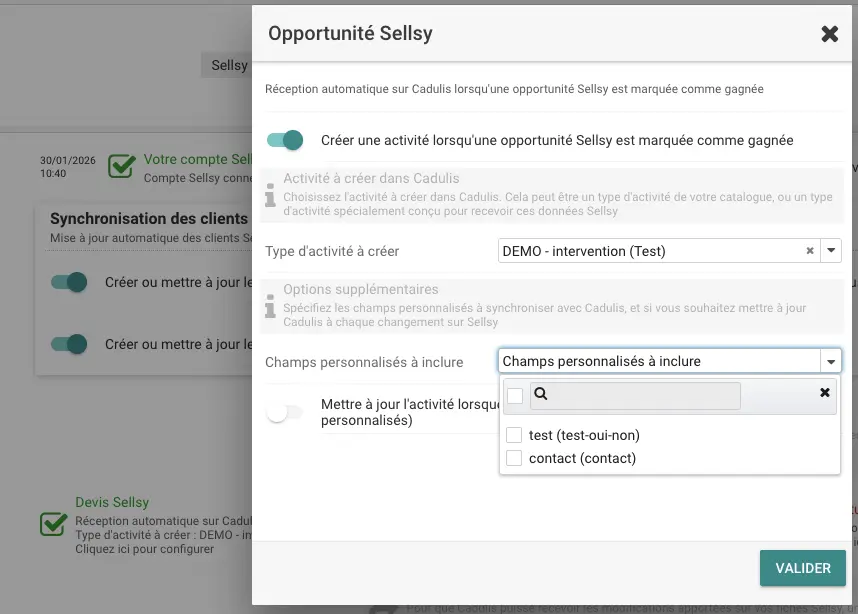
Once OAuth authentication is validated, you can access advanced settings:
Third-Party (Customer) Synchronization
You define the source of truth according to your needs. Cadulis allows flexible synchronization:
- Sellsy to Cadulis: Essential for supplying your field teams with new customers acquired by your sales reps.
- Cadulis to Sellsy: If your technicians correct an address or contact in the field, the information is instantly updated in the CRM.
Note: Sellsy remains your master tool for managing complex structures. Cadulis synchronizes the main contact and intervention address to ensure operational efficiency.
Product Synchronization
Your catalog is shared between both tools, in both directions:
- Sellsy to Cadulis: Your technicians in the field find the same items as in your quotes, with no re-entry.
- Cadulis to Sellsy: An item created or modified in Cadulis is reported in your Sellsy catalog.
Items used during interventions thus directly correspond to Sellsy products, allowing you to generate invoices without further processing.
From Opportunity to Intervention (Inbound Flow)
Automate the creation of interventions as soon as a Quote is accepted or an Opportunity is won in Sellsy.
Cadulis does more than just create an empty record. The integration retrieves all the context so the technician has everything needed without manual entry:
- Commercial Data: Case owner (Sales Rep), amount, subject.
- Technical Context: Full quote description, public and private notes.
- Contact Details: Contact name, phone, precise address.
- Deep Link: A direct link to the Sellsy object is stored for reference.
Smart Mapping (Custom Fields)
This is where the integration shows its full power. You can map your Sellsy custom fields with Cadulis data to drive your processes.
Advanced use case example: Imagine a custom field “Annual Contract” (Yes/No) in your Sellsy opportunity.
- Cadulis detects this field during import.
- The information is automatically tagged on the Cadulis customer record.
- This can automatically trigger a recurring intervention for maintenance, with no human action required.
2. Automations to Sellsy (Outbound Flow)
Once the intervention is completed, Cadulis sends the data back to Sellsy via the Trigger engine.
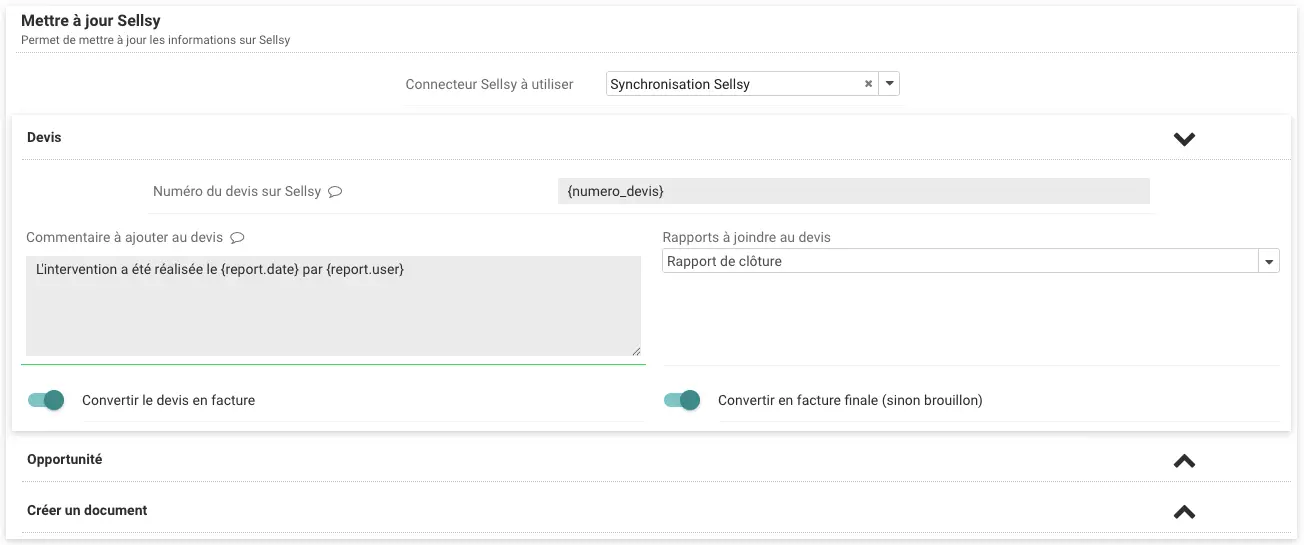
You can configure multiple simultaneous or conditional actions:
Commercial Document Generation
- Quote Conversion: Turn the initial quote into an Invoice (Draft or Final) directly from the intervention.
- Invoice Creation: Generate a new invoice based on the items used in Cadulis, thanks to product synchronization.
Archiving and Enrichment
Files and comments can be sent to the related quote, invoice, or opportunity in Sellsy, or directly to the Sellsy customer record:
- File Upload: The intervention report (PDF) generated by Cadulis, as well as photos and attachments from the intervention, are automatically deposited in the Documents section of the Sellsy object. Ideal for legal archiving.
- Destination folder: You choose the Sellsy folder where the files are stored. If it does not yet exist, Cadulis creates it automatically.
- Comments: Add a comment to the quote, invoice, opportunity, or customer record to notify your sales and accounting teams of the intervention’s completion.
3. Traceability and Seamlessness
For managers, the integration offers total transparency and smooth navigation between both ecosystems.
Cross Navigation (Deep Linking)
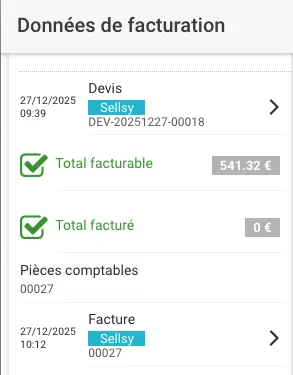
No need to manually search for the customer record. When a document is generated or linked, Cadulis displays a direct link. With one click from the Cadulis intervention, you open the corresponding quote or invoice in the Sellsy interface.
🕵️♂️ Total Transparency
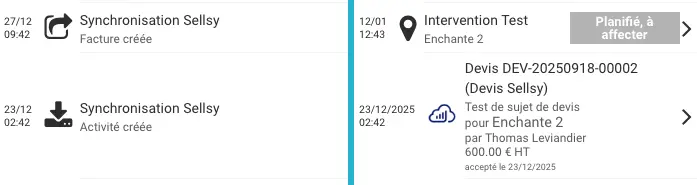
Cadulis provides you with complete logs to track every data exchange. Whether it’s receiving a signed quote, updating a customer, or sending an invoice, everything is traced. You stay in control of your data flows.
Ensure your success with Cadulis.



A 30-minute video call to understand everything!