The Cadulis application, documentation, and email support are nevertheless available in your language. You can create your account for free in 1 minute!

Connect Cadulis to Merci Facteur
Introduction to Merci Facteur
Merci Facteur is the leading solution for sending digitized postal mail. No more need for a printer, envelope, or stamp: your digital documents are printed, folded, and handed over to La Poste the same day.
In the context of field operations, sending mail often remains a legal requirement (Notice of visit) or a relational necessity (Reminders, Summons).
By connecting Cadulis to Merci Facteur, you turn a manual administrative chore into a 100% automated, reliable, and traceable process.
Use Case: The 'Drill-down' Confirmation Strategy
Our clients use this integration to maximize attendance rates while optimizing costs. Here’s an example of an automated scenario in Cadulis:
- D-7 (Email): Free confirmation email sent with a link to the Cadulis Customer Portal to confirm or reschedule.
- D-3 (SMS): If no response, a reminder SMS is sent (low cost).
- D-2 (Mail): As a last resort, an automatic Merci Facteur letter is sent containing the portal connection QR-Code.
Result: A drastic reduction in calls to the switchboard and missed appointments (No-shows), using the more expensive mail channel only when strictly necessary.
1. Connector Configuration
The connection is made using secure API keys. Go to Settings > External Access, Merci Facteur section.
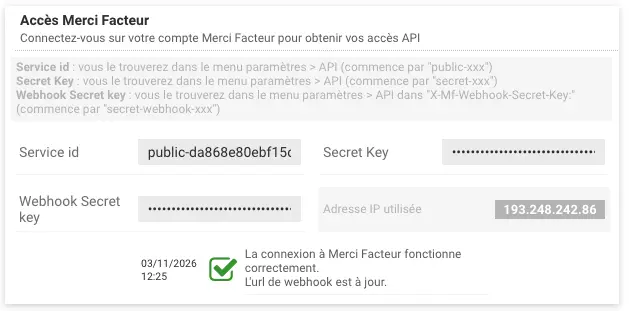
You need to retrieve 3 pieces of information from your Merci Facteur account (Menu Settings > API):
- Service ID: The public identifier of your account.
- Secret Key: Your private authentication key.
- Webhook Secret Key: The key used to secure information feedback (NPAI).
Once the fields are filled in, Cadulis instantly validates the connection.
2. Creating the Sending Automation
Mail sending is configured like any other Trigger (Automation) in Cadulis. Create a new trigger, choose your conditions (e.g., “Intervention Status = Scheduled” AND “Customer Confirmation = No”), then configure the Merci Facteur action.
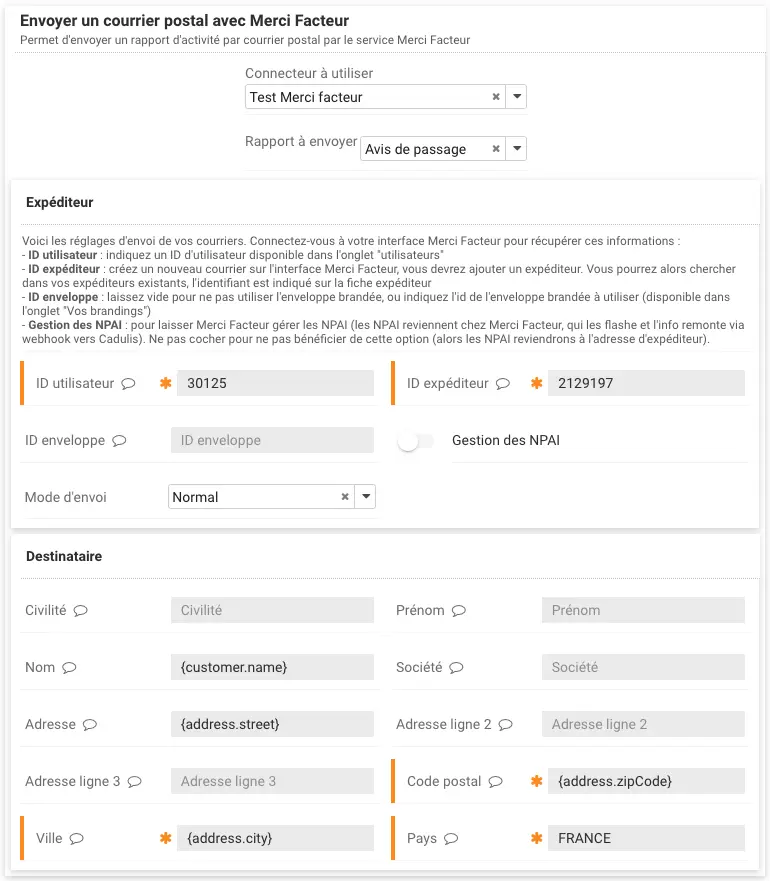
Dynamic Personalization
The interface allows you to precisely define the content and recipient:
- Report to send: Choose the document template (PDF) generated by Cadulis (e.g., Notice of visit, Quote, Intervention report).
- Sender: Select the sender ID and envelope ID (to use your branded envelopes configured in Merci Facteur).
- Sending mode: Standard mail or Registered with acknowledgment of receipt.
- Recipient: Use Cadulis Dynamic Variables so the address adapts to each intervention.
Tip: Use the variable selector (💬 icon) or check the list of available variables .
Example: In the Address field, enter
{client.adresse}to automatically retrieve the address from the client record.
3. Validation and Control (The Security Gate)
Unlike emails, a postal letter cannot be “canceled” once sent. That’s why Cadulis includes a security step.
Letters generated by automation are not sent immediately. They are placed in a queue.
To manage them:
- Go to your Automations list and click on the relevant one.
- You will see the list of letters ready to be sent.
- You can preview the final PDF and check the address.
- Approve the mailings (individually or in bulk) or cancel them if necessary.
4. Tracking and Billing
Traceability (NPAI)
Cadulis retrieves feedback information via Webhook. If a letter is returned as NPAI (Does Not Live at the Indicated Address), the information is logged in the application Logs, allowing you to clean up your customer database.
Pricing
Printing and postage are billed to your Merci Facteur account. Cadulis deducts 0.2 credit (0.098 € excl. VAT) per letter: this covers sending and mandatory archiving of the report for one year. Complimentary credits do not pay for the letter. For the cost per letter, please see our Pricing page.
Ensure your success with Cadulis.



A 30-minute video call to understand everything!