
Two quotes on the desk, for the same need: a fire maintenance software. The first is three pages long and talks about scheduling, a mobile app, and automatic reports. The second, on the other hand, is fifteen pages, mentioning delivery notes, stock valuation, and six months of deployment support. The amounts, meanwhile, are worlds apart.
And so you find yourself comparing two things that don't do the same job. The comparison is impossible—not because the quotes are poorly made, but because they answer two different questions.
Before comparing features, you need to know which family the proposed solution belongs to.
Fire Maintenance Software: Three Tools Often Confused
The fire maintenance software market mixes three categories under similar names. Distinguishing them already solves half the problem.
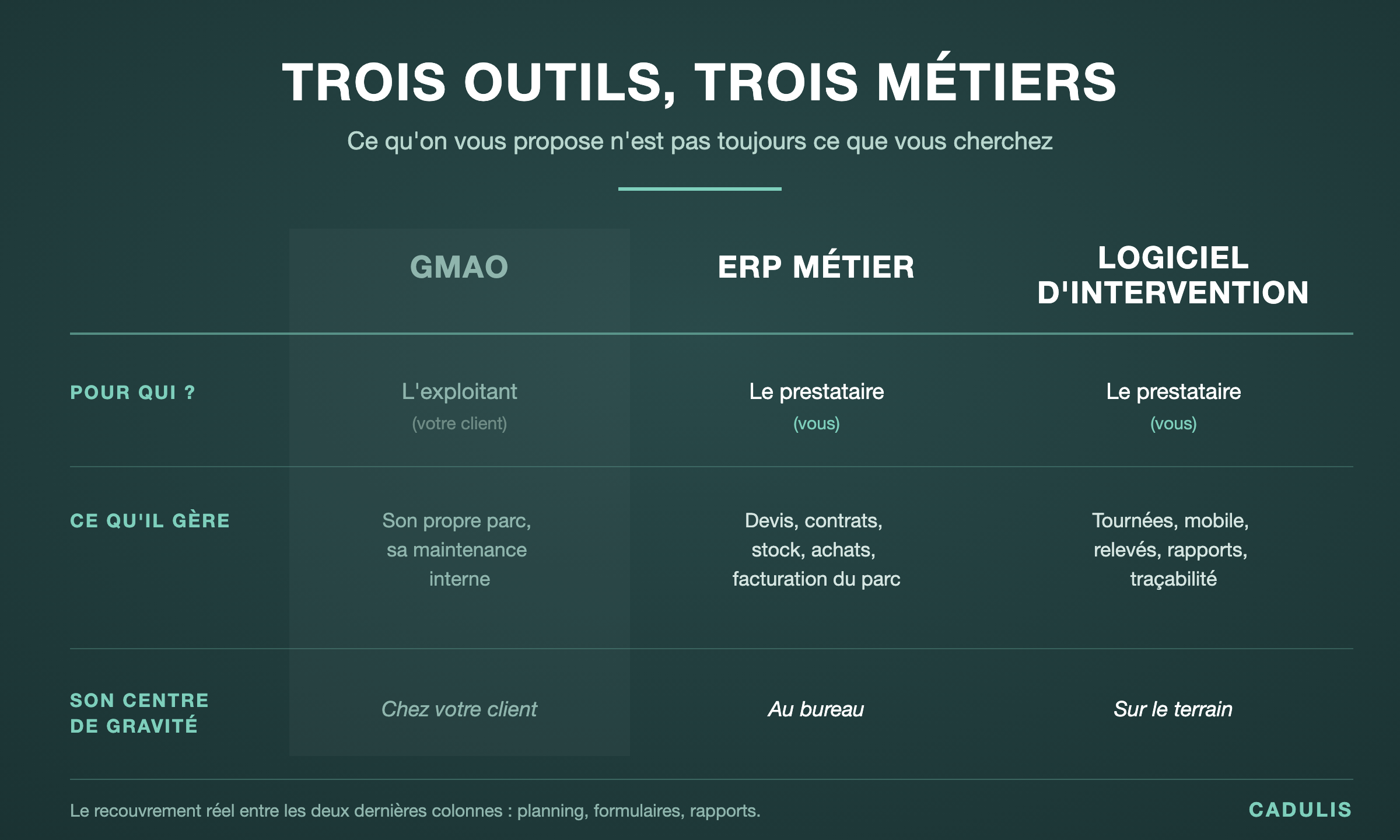
CMMS: The Tool for Those Who Own the Equipment
A CMMS is primarily used by an operator managing their own equipment fleet: the hospital, the factory, the property manager. It tracks their equipment, triggers preventive maintenance, and logs breakdowns.
This is not your case, since you work on your clients’ equipment as a service provider. This is a different position, with different obligations.
Industry-Specific ERP: The Fire Maintenance Software That Manages Your Business
A clarification before going further, because the acronym can be misleading in our field. Here, ERP means Enterprise Resource Planning—an integrated management software that handles accounting, inventory, and invoicing. Nothing to do with the public-access establishment that the same acronym refers to in fire safety regulations. Same words, two different worlds.
An industry-specific fire ERP covers the full cycle of your commercial activity: quotes, orders, delivery notes and invoices, client equipment tracked item by item, inventory spread across multiple warehouses with transfers, inventories, and purchases. It also manages configured verification cycles—annual, five-year, ten-year, like the annual inspection and ten-year overhaul of fire extinguishers—to which billable services are linked.
Its center of gravity is therefore at the office. It encompasses field operations, but it doesn't start there.
Field Service Software: The Fire Maintenance Tool That Manages Your Field Operations
Field service software applied to fire maintenance starts from the other end. It organizes routes, sends jobs to technicians, collects readings, generates reports, and logs what has been done.
Its center of gravity is therefore on the road and in technical rooms. It communicates with your management system, but does not replace it.
The overlap between the last two families is closer than you might think: scheduling, data collection forms, and reports. Everything else, however, diverges.
What an Industry-Specific ERP Does Better
Let’s be clear: in several areas, an industry-specific ERP has no serious competition from field service tools.
Inventory, Purchasing, and Equipment
If your business includes selling fire extinguishers, refills, hydraulic tests, and spare parts, you are managing a store. Moreover, it is often multi-warehouse, with transfers between branches, restocking thresholds, and accounting valuation.
Field service software does not do this, nor does it claim to, whereas an industry-specific ERP does.
Invoicing Linked to the Equipment Fleet
Billing, for example, three hundred contracts with different cycles, with services triggered according to equipment type and frequency, is pure management. When the system knows that a five-year inspection on a specific device generates a particular invoice line, you save considerable administrative work.
One System, One Entry
This is ultimately the strongest argument for the ERP, since everything lives in one place. In other words, no interface to maintain, no question about which tool holds the truth, no double configuration.
If your main challenge is here, stop reading comparisons and go see an industry-specific ERP vendor. Indeed, field service software, even if specialized in fire maintenance, will not solve an invoicing or inventory problem, regardless of the quality of its mobile app.
What Field Service Software Does Better
The reverse is equally true.
The Field
Optimizing a route by considering skills, zones, and emergencies requires specific expertise. Having a technician enter data in a second basement without network coverage as well. An ERP designed around commercial management often treats these topics secondarily, because they are not its core focus.
When your days depend on the number of sites visited and the quality of the data collected, the difference between an industry-specific ERP and a fire maintenance tool designed for the field becomes quickly apparent.
Implementation Time
An industry-specific ERP is deployed over months, as it needs to be configured, data migrated, teams trained and supported. The project thus requires someone on your side, often the manager or operations director, for a good part of the year.
A field service tool, on the other hand, is set up in days. This difference is not about product quality: it is a direct result of their scope.
Cost and Exit
Finally, two elements weigh heavily for a company with five to twenty technicians: what you pay each month, and what happens when you want to leave. The models are radically different—per-user license or usage-based billing, multi-year commitment or free cancellation, exportable data or data locked in the vendor’s format.
That’s why these questions must be asked before signing, never after.
Five Questions to Choose Your Fire Maintenance Software
Rather than comparing feature lists of each fire maintenance software, answer these. They’re much faster.
Where is your pain point, in the office or on the road? For example, if you spend your evenings redoing invoices, that’s not the same diagnosis as if your technicians lose two hours a day traveling.
Is your invoicing already working properly? Many companies have an accounting solution that suits them. And replacing what works just to get what’s missing is expensive.
Do you manage equipment, or only inspections? A company that sells and refills fire extinguishers does not have the same needs as one that inspects an existing fleet.
How many people will use the tool? Below a certain size, a per-user license becomes the main expense—and it discourages equipping planners and administrative staff, who would actually benefit from it.
Who will lead the project in your company? A lengthy deployment requires someone available for several months. Does this person actually exist within your organization?
The most common scenario: it’s not a choice
In reality, however, many companies don’t have to make a decision.
First, they keep their management and invoicing solution, which works and is familiar to everyone. Then, they add a dedicated fire maintenance tool for field operations, where the need is most acute. Finally, they connect the two via an interface, so that completed interventions flow into invoicing without re-entering data.
This approach has three advantages. Deployment remains short, since the existing system is untouched. The risk is reduced, since a failure doesn’t jeopardize invoicing. Finally, the investment is spread over time.
However, it requires one strict condition: the two systems must be able to communicate. So check for the presence of an open interface before signing, not after. Because a tool that doesn’t communicate will force you into double data entry — exactly the problem you were trying to solve.
Three pitfalls during a fire maintenance software demo
A sales demo always shows a product at its best. There’s nothing unusual about that — but a few simple requests can reveal a lot.
Make the demo about your own case. Demos usually run on lab data: three clients, ten pieces of equipment, no exceptions. So bring one of your real sites, with its eighty devices spread across six floors, its two missing extinguishers, and its annex building that doesn’t quite belong to the same contract. You’ll immediately see what the tool can handle.
Ask to see the phone, not the desktop screen. The part your technicians will use every day is often shown at the end of the presentation, in three minutes. Reverse the order. Then ask the question that matters in this business: put the device in airplane mode, enter a check, exit. What happens next is worth more than any sales pitch.
Request the cost for a full year, not just the advertised monthly price. Ask what you would actually pay over twelve months — interface, automations, dashboards, SMS sending, configuration days, new staff training — including the two technicians you plan to hire. The difference from the brochure price can be surprising.
In short, a confident vendor will agree to these three requests without hesitation. Any reluctance on one of them is an answer in itself.
Beyond features: what a fire maintenance software really costs
Feature lists all look alike, but they rarely tell the whole story. Four points deserve your attention.
The billing model: paying per user or per usage makes all the difference when your activity varies from month to month, which is common in a business driven by contractual deadlines.
Commitment: a multi-year commitment ties you to a choice made before you’ve even used the tool.
Reversibility: your intervention data forms your history and, in part, your proof during an inspection. Make sure you can retrieve it in a usable format, at any time.
What’s included: some offers bill separately for the interface, automations, dashboards, or SMS sending. As a result, the advertised price and the actual invoice can end up quite far apart.
In summary
A business ERP manages your company, while a field intervention software manages your operations. Neither replaces the other, and the best fire maintenance software entirely depends on where your bottleneck is.
Thus, a company struggling to invoice its fleet needs an ERP. On the other hand, a company whose technicians lose their days on the road and re-enter their reports on Fridays needs something else. And most end up with both, connected — which remains, in many cases, the most reasonable solution.
Cadulis is a French field intervention management software: planning and route optimization, mobile app with offline mode, equipment-type specific forms, automatic reports, and open interface. No commitment, with 200 free credits to get started. Discover how Cadulis integrates into your organization.